

Wood
from $5.99/ 30 days
For you and a few friends
- About 10 players
- 2 GB RAM, the server’s power
- 20 GB space for worlds & mods
- Fast AMD Ryzen CPU
- Protection against attacks (DDoS)

For you and your friends. No tech skills needed: tell us what you play, we set up the rest.
 Instant setupOnline in 90 seconds
 Mods & pluginsOne-click install
 Automatic backupsYour world stays safe
 4 locationsGermany · USA · India
 Fast supportUsually under 10 minutes
Most of our players start right here. Four honest answers before you begin.
Your own Minecraft world that stays online, even when your computer is off. Your friends join with an address, like a phone number for your world.
No. Nothing to download, no router settings, no files to edit. You click through it in your browser, and we set everything up.
Our support usually replies in under 10 minutes. Real people who know Minecraft, not a bot.
Your world is backed up automatically. One click brings it back.
Four steps. You only decide two things, we handle everything else.
Just you and friends, a modpack, or friends on console and phone. We choose the right software.
Move one slider. We pick the right server size for you.
Card, PayPal and more. Your server sets itself up, nothing to install.
Open Minecraft, go to Multiplayer, click Add Server and paste your address. That’s it.
No files, no commands. Start and stop your server, invite friends, install mods and bring back a backup, each with one click.
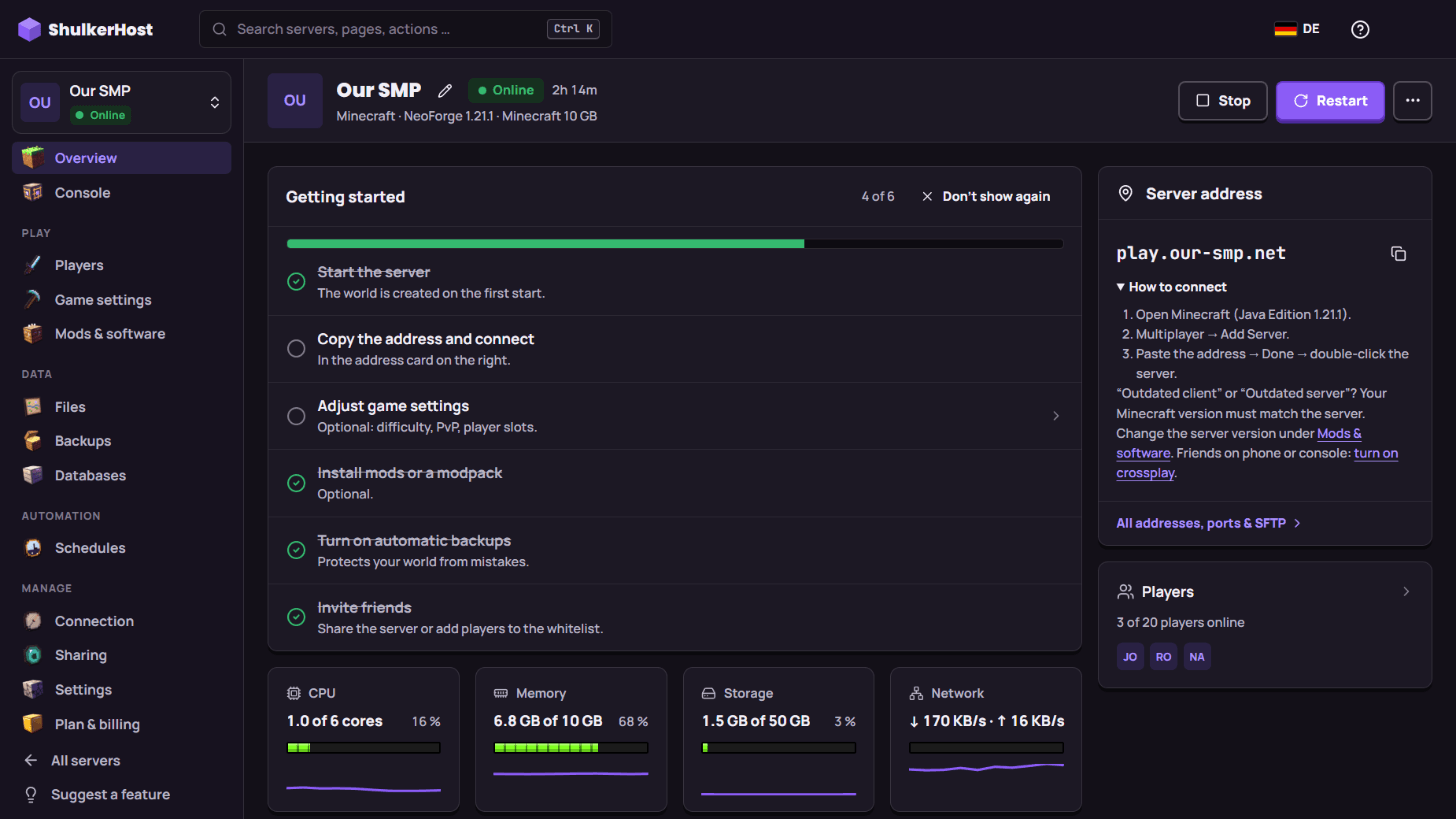
Example view of the panel with a demo server.
Pick by how many people play. Every plan has everything included, prices include VAT where it applies, and you can switch plans any time.
from $5.99/ 30 days
For you and a few friends
from $21.99/ 30 days
For busy worlds and big modpacks
from $43.49/ 30 days
For large communities
Java, Bedrock or both at once. The right server software installs with one click.
Which one do I have? Minecraft on a PC or Mac via the Minecraft Launcher is Java. On Xbox, PlayStation, Switch, a phone or the Windows app it is Bedrock. A mix? Pick crossplay.
Mods, plugins and full flexibility.
Play across supported devices.
Bring Java and Bedrock players together.
Every modpack on CurseForge, Modrinth and FTB — one click, and we install the right loader and version.
All the Mods 10, All the Mods 9, RLCraft, Pixelmon, Cobblemon, Vault Hunters 3 and thousands more.
View all modpacks → Instant setupOnline in about 90 seconds
 DDoS protectionFiltered at the network edgeAutomatic backupsRestore from the panelGermany, USA & IndiaPick the one closest to your playersEvery modpackCurseForge, Modrinth & FTBFast supportUsually under 10 minutes
Pick the closest location in the configurator — moving your world later is free.
| Location | Best for players in | Your ping | 2 GB · 30 days from |
|---|---|---|---|
| GermanyGermany & Europe | Germany & Europe | … | $5.99 |
| Salt Lake CityUS West, Central US & Canada | US West, Central US & Canada | … | $6.99 |
| CharlotteUS East Coast & Canada | US East Coast & Canada | … | $6.99 |
| NoidaIndia & South Asia | India & South Asia | … | $14.49 |
No. You pick what you want to play, we pre-select the right software, memory and settings. There are no config files to edit and no port forwarding to set up.
About 90 seconds after checkout. You get the server address right away — share it and your friends can join.
Your server address shows up in your panel right away. Your friends open Minecraft, click Multiplayer, then Add Server, paste the address and click Done. They need the same Minecraft version as the server — you can change the version any time with one click.
Minecraft on a PC or Mac started from the Minecraft Launcher is Java. On Xbox, PlayStation, Switch, phones, tablets or the Windows app from the Microsoft Store it is Bedrock. Not sure? Start with Java — that is what most friend groups play.
Yes. Click Turn on crossplay in your panel and we install Geyser and Floodgate for you. Friends on phones, tablets and the Windows app then add your server with the address and port shown there, no Java account needed. Consoles (Xbox, PlayStation, Switch) have no “Add Server” button, so they need a small workaround — our support walks you through it.
Upgrade in one click from the panel. You only pay the difference for the rest of your current term — no migration, your world stays exactly where it is.
Yes. Every modpack on CurseForge, Modrinth and FTB — All the Mods, RLCraft, Pixelmon, Cobblemon and thousands more. Pick it, and we install the correct loader and version for you.
Usually in under 10 minutes. Real people who know Minecraft servers — no bots, no ticket maze.
Yes. Create an account and confirm your email — your free 2 GB server in Germany is ready right away, no payment details needed. It has 12 hours of play time — the time only counts while the server is starting or running, not while it’s stopped (use it within 7 days). Like it? Book exactly that server and keep your world; new customers get 20% off the first term with the code FIRSTBLOCK.
Card (Visa, Mastercard, Amex), Apple Pay, Google Pay, PayPal and more local methods. You pay right in your panel.
Yes. Pick 3, 30, 90 or 365 days. With automatic renewal you can cancel any time; the server runs until the end of the paid term. Longer terms renew by 30 days at a time, so you are never locked in for another year. Or pay once and the term simply ends. Plus a 72-hour money-back guarantee on your first order.
In Germany, the USA (Salt Lake City and Charlotte) and India (Noida). Pick the one closest to most of your players in the configurator.
Online in 90 seconds. Or try it free for 12 hours first, no payment details needed.